VX Search Logo

Search Files by File System Depth

Advanced users are provided with the 'File Name Depth' search rule, which is capable of matching files by the depth of the file system. This rule may be useful when the user is required to exclude files located too deep in the file system or match files located on a very specific level in the file system.
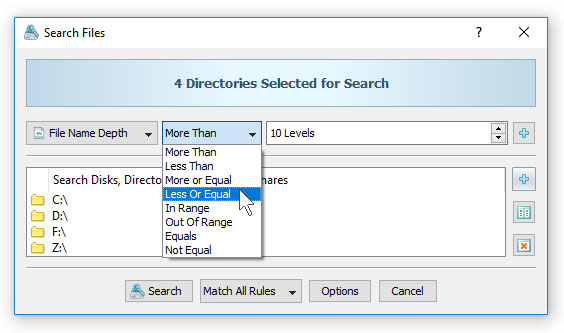
Search Files by File System Depth

In order to search files by the depth of the file system, open the file search dialog and add the 'File Name Depth' search rule, select an appropriate operator and enter the number of file system levels to search for. The 'File Name Depth' rule provides a number of operators allowing one to match files with the file system depth more, less, equal or not equal to a user-specified value. In addition, the user is provided with 'In Range' and 'Out Of Range' file system depth operators.

VX Search News

9-Apr-2026

VX Search v18.0 redesigns the file search results dialog, adds the ability to filter file search reports by the report ID and improves the file search reports dialog. In addition, the new product version improves the JSON, CSV and XML file search reports, improves the main VX Search GUI application and fixes a number of bugs.

11-Mar-2026

VX Search v17.9 adds unique file search report IDs and a hash signature of searched input directories for compliance purposes. In addition, the new product version improves the PDF and HTML file search reports, improves the performance of the file search operations, improves the VX Search Server product version and fixes a number of bugs.

More News